


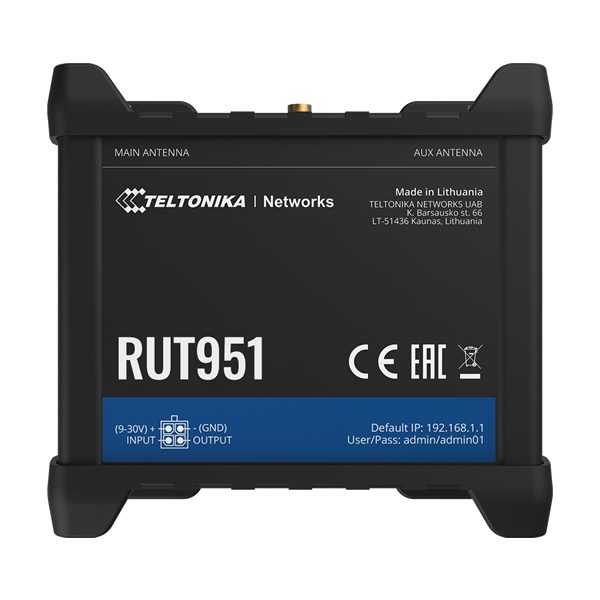
Teltonika RUT951 Dual-SIM 4G LTE Router
The Teltonika RUT951 has taken all of the best features of the popular RUT950, with the difference in the two units laying inside the unit, with the QualComm Chip being replaced by one from MediaTek to try and avoid any disturbances in the global supply chain caused by the chipset and semiconductor shortage seen in recent times.
Powered by RutOS and compatible with Teltonika’s Remote Management System (RMS), the RUT951 router is ideal for use in a number of professional installations. With the support of the centralised Teltonika Remote Management System you will be able to access, control and monitor all of your routers within a single platform.
Teltonika RUT951 Key Highlights
- Connectivity: CAT4 4G/LTE, 3G, 2G
- WAN Failover: Automatic switch to available backup connection
- WiFi: Wireless Access Point with Hotspot functionality
- Dual SIM: 2 x SIM slots with auto failover, backup WAN and other switching scenarios
- 4 x Ethernet interfaces with VLAN functionality
- Compatible with Teltonika Remote Management System (RMS)
SPECIFICATION
| Features / filters | |
| Communication type | 4G/LTE, Wi-Fi, |
| LTE category | Cat.4 (150Mb/s Download, 50Mb/s Upload) |
| Maximum wireless transmission speed | 300 Mb/s |
| Number of LAN ports | 4x 10/100BaseTX (RJ45) |
| Operating frequency | 2.4 GHz |
| Wireless network standards | IEEE 802.11n |
| Antenna gain | Under 10dbi |
| IP Rating | IP30 |
| LTE bands | B1 (2100MHz), B3 (1800MHz), B7 (2600MHz), B8 (900MHz), B20 (800MHz), B28A (700 MHz), B38 (2600MHz), B40 (2300MHz), B41 (2500 MHz), |
| RAM memory | 128MB |
| Type of device power supply | Passive PoE, Power supply, |
| Variant | RUT951 000000 |
| Mobile network | |
| Mobile module | 4G (LTE) – Cat 4 up to 150 Mbps 3G – up to 42 Mbps 2G – up to 236.8 kbps |
| Status | Signal Strength (RSSI), SINR, RSRP, RSRQ, EC/IO, RSCP, bytes sent/received |
| SMS | SMS status, SMS configuration, sending/reading SMS via HTTP POST/GET, EMAIL to SMS, SMS to EMAIL, SMS to HTTP, SMS to SMS, scheduled SMS, SMS autoreplay, SMPP |
| Black/white list | Black/white list of operators |
| Bandwidth management | Band lock, display of bandwidth status in use |
| APN | Auto APN |
| Bridge mode | Direct connection (bridge) between mobile ISP and device in LAN |
| Passthrough | The router assigns its mobile WAN IP address to another device on the LAN |
| Multiple PDNs (optional) | Ability to use different PDNs to access multiple networks and services |
| Wireless networks | |
| Wireless mode | IEEE 802.11b/g/n, access point (AP), station (STA) |
| Wi-Fi security | WPA2-Enterprise – PEAP, WPA2-PSK, WEP, WPA-EAP, WPA-PSK; AES-CCMP, TKIP, Auto Cipher, client separation |
| SSID | SSID stealth mode and access control based on MAC address |
| Wi-Fi users | Up to 100 simultaneous connections |
| Hotspot | Captive portal (hotspot), internal/external Radius server, embedded in a configurable landing page |
| Ethernet | |
| WAN | 1x WAN (can be configured for LAN) 10/100 Mbps, IEEE 802.3, IEEE 802.3u compliant, supports Auto MDI/MDIX |
| LAN | 3x LAN port, 10/100 Mbps, compliant with IEEE 802.3, IEEE 802.3u standards, automatic MDI/MDIX support |
| Network | |
| Routing | Static routing, dynamic routing (BGP, OSPF v2, RIP v1/v2, NHRP) |
| Network protocols | TCP, UDP, IPv4, IPv6, ICMP, NTP, DNS, HTTP, HTTPS, FTP, SMTP, SSL v3, TLS, ARP, VRRP, PPP, PPPoE, UPnP, SSH, DHCP, Telnet client, SNMP, MQTT, Wake On Lan (WOL) |
| VoIP passthrough support | H.323 and SIP-alg protocol NAT helpers for proper routing of VoIP packets |
| Call monitoring | Ping Reboot, Wget Reboot, Periodic Reboot, LCP and ICMP for link inspection |
| Firewall | Port forwarding, network traffic rules, custom rules |
| DHCP | Static and dynamic IP allocation, DHCP relayd |
| QoS | Prioritization of traffic by source/destination, service, protocol or port, WMM, 802.11e |
| DDNS | >25 service providers supported, others can be configured manually |
| Network backup | VRRP, mobile, wired, Wi-Fi options, any of which can be used as a backup, using automatic failover |
| Load balancing | Balancing Internet traffic across multiple WAN connections |
| SSHFS (optional) | Possibility of mounting a remote file system via SSH protocol (not available in standard software) |
| Security | |
| Authentication | Shared key, digital certificates, X.509 certificates |
| Firewall | Pre-configured firewall rules can be enabled via Web.UI, Unlimited firewall configuration via CLI, DMZ, NAT, NAT-T |
| Preventing attacks | DDOS prevention (SYN protection, SSH attack prevention, HTTP/HTTPS attack prevention), Port scan prevention (SYN-FIN, SYN-RST, X-mas, NULL flags, FIN scan attacks) |
| VLAN | Tag-based VLAN separation |
| Mobile limit control | Setting custom data limits for the SIM card |
| WEB Filter | Black list to block unwanted websites, white list to determine allowed sites |
| Access control | Flexible access control for TCP, UDP, ICMP packets, MAC address filters |
| Secure Boot | Cryptographic integrity check of each boot process (available with special order code RUT950U072C0) |
| VPN | |
| OpenVPN | Ability to run multiple clients and servers simultaneously, 12 encryption methods |
| OpenVPN encryption | DES-CBC, RC2-CBC, DES-EDE-CBC, DES-EDE3-CBC, DESX-CBC, BF-CBC, RC2-40-CBC, CAST5-CBC, RC2-64-CBC, AES-128-CBC, AES-192-CBC, AES-256-CBC |
| IPsec | IKEv1, IKEv2, supports up to 4 IPsec VPN tunnels (instances), with 5 encryption methods (DES, 3DES, AES128, AES192, AES256) |
| GRE | GRE tunnel |
| PPTP, L2TP | Client/server services can run simultaneously |
| Stunnel | Proxy designed to add TLS encryption functionality to existing clients and servers without changing program code |
| DMVPN | A method for building scalable IPsec VPN networks |
| SSTP | SSTP client instance support |
| ZeroTier | ZeroTier VPN |
| WireGuard | WireGuard VPN client and server support |
| Modbus TCP Slave | |
| ID filtering | Reply to one identifier in the range [1;255] or any |
| Allow remote access | Allow access over WAN |
| Custom Registers | MODBUS TCP Custom Register Block requests that read/write to a file inside the router and can be used to extend the functionality of the MODBUS TCP Slave |
| Modbus TCP Master | |
| Supported functions | 01, 02, 03, 04, 05, 06, 15, 16 |
| Supported data formats | 8 bit: INT, UINT; 16 bit: INT, UINT (MSB or LSB first); 32 bit: float, INT, UINT (ABCD (big-endian), DCBA (little-endian), CDAB, BADC) |
| Modbus data to server | |
| Protocol | HTTP(S), MQTT, Azure MQTT |
| MQTT Gateway | |
| MQTT Gateway | Enables sending commands to and receiving data from a MODBUS Master via an MQTT broker |
| DNP3 | |
| Supported modes | TCP Master, DNP3 Outstation |
| Monitoring and management | |
| Web.UI | HTTP/HTTTPS, status, configuration, FW update, CLI, troubleshooting, event log, system log, kernel log |
| FOTA | Remote firmware update from server, automatic notifications |
| SSH | SSH (v1, v2) |
| SMS | SMS status, SMS configuration, sending/reading SMS via HTTP POST/GET |
| Call | Restart, Status, WiFi on/off, Mobile data on/off, Output on/off |
| TR-069 | OpenACS, EasyCwmp, ACSLite, tGem, LibreACS, GenieACS, FreeACS, LibCWMP, Friendly tech, AVsystem |
| MQTT | MQTT Broker, MQTT publisher |
| SNMP | SNMP (v1, v2, v3), SNMP trap |
| JSON-RPC | API management over HTTP/HTTPS |
| MODBUS | MODBUS TCP status/control |
| RMS | Teltonika Remote Management System (RMS) – Teltonika Remote Management System |
| IoT platforms | |
| The cloud of things | Allows monitoring of: Device data, Mobile data, Network information, Availability |
| ThingWorx | Allows you to monitor: WAN Type, WAN IP Mobile Operator Name, Cellular signal strength, Cellular network type |
| Cumulocity | Allows you to monitor: Device model, revision and serial number, Mobile Cell ID, ICCID, IMEI, connection type, carrier, signal strength, WAN type and IP |
| Azure IoT Hub | Can send device IP, number of bytes sent/received/ 3G connection status, network link status, IMEI, ICCID, model, manufacturer, serial number, revision, IMSI, Sim status, PIN status, GSM signal, WCDMA RSCP WCDMA EC/IO, LTE RSRP, LTE SINR, LTE RSRQ, CELL ID, operator, operator number, connection type, temperature, Azure IoT Hub server PIN number |
| System parameters | |
| CPU | Mediatek MIPS 24Kc 580 MHz |
| RAM | 128 MB, DDR2 |
| Flash Memory | 16 MB, SPI Flash |
| Software/Configuration | |
| Web.UI | Update software from file, check software on server, configuration profiles, configuration backup, restore point |
| FOTA | Software/configuration update from server |
| RMS | Software/configuration update for multiple devices |
| Save settings | Software update without losing current configuration |
| Operating System | RutOS (OpenWrt operating system based on Linux) |
| Supported languages | Busybox shell, Lua, C |
| Development Tools | SDK with included graphical environment |
| Inputs/Outputs | |
| Inputs | 1 x digital input, 0-5 V detected as logic low, 8-30 V detected as logic high |
| Outputs | 1 x digital open collector output, max. output voltage 30 V, 300 mA |
| Event handling | SMS, EMAIL, RMS |
| Power supply | |
| Connector | 4-pin industrial DC power connector |
| Input voltage range | 9 – 30 VDC (4-pole industrial socket), reverse polarity protection, surge protection >33 V DC 10 us max. |
| PoE (passive) | Passive PoE over spare pairs (available from hardware version 0007 and batch number 0010) Power over LAN port, incompatible with IEEE802.3af, 802.3at and 802.3bt |
| Power consumption | < 2 W in idle mode, < 7 W max. |
| Physical interfaces (ports, LED, antennas, buttons, SIM) | |
| Ethernet | 4x RJ-45, 10/100 Mbps |
| I/O | 1 x digital input, 1 x digital output on 4-pin power connector |
| LEDs | 1 bi-color connection status LED 5 connection strength LEDs 4 LAN status LEDs 1 power LED |
| SIM | 2 x SIM Slots (Mini SIM – 2FF), 1.8 V/3 V External SIM tray |
| Power supply | 4-pin industrial DC power connector |
| Antennas | 2x SMA for LTE, 2x RP-SMA for Wi-Fi antenna |
| Reset | Buttons for restarting/restoring factory settings |
| Physical characteristics | |
| Housing material | Aluminium housing, plastic panels |
| Dimensions | 110 x 50 x 100 mm |
| Weight | 287g |
| Mounting options | DIN rail (can be mounted on two sides), placement on flat surface |
| Work environment | |
| Ambient temperature range during operation | From -40°C to 75°C |
| Ambient humidity during operation | 10% to 90%, non-condensing |
| Protection class | IP30 |
| Certificates | |
| Regulations | CE/RED, UKCA, CB |
| EMI Immunity | |
| Standards | EN 301 489-1 V2.2.3, EN 301 489-17 V3.2.4, Final draft EN 301 489-52 V1.2.0, EN 55032:2015 A1:2020, EN 55035:2017 A11:2020, EN 61000-3-3:2013 A1:2019, EN IEC 61000-3-2:2019 |
| ESD | EN 61000-4-2:2009 |
| Radiation resistance | EN 61000-4-3:2020 |
| EFT | EN 61000-4-4:2012 |
| Surge immunity (AC power port) | EN 61000-4-5:2014 A1:2017 |
| Resistance to conduction | EN 61000-4-6:2014 |
| DIP | EN IEC 61000-4-11:2020 |
| RF | |
| Standards | EN 300 328 V2.2.2, EN 301 908-1 V13.1.1, EN 301 908-2 V13.1.1, EN 301 908-13 V13.1.1 |
| Security | |
| Standards | EN IEC 62311:2020 IEC 62368-1:2018 EN IEC 62368-1:2020 A11:2020 |